
Skip to content

The new Intuit Enterprise Suite is here! Learn more. 

Ledger Consulting

Ledger Consulting

  • Home
  • QuickBooks SupportExpand
    • Intuit Enterprise Suite
    • QuickBooks Online
    • QuickBooks Desktop Support
    • Convert to QuickBooks Online
  • Inventory
  • Analytics
  • Insights
  • Get Help
Intuit Enterprise Suite is here. Learn More!

Ledger Consulting

Backorders in QuickBooks

October 26, 2016March 10, 2026

If you have inventory, there may be times you need to record backorders in QuickBooks. So how does QuickBooks handle backorders? It’s easier than you might think.

Handling Backorders in QuickBooks

The first step in this process is to create a purchase order from the home page icon (shown below).

QuickBooks Purchase Orders, Fort Worth, Benbrook, Keller, Mansfield,

Create the purchase order for the desired number of inventory parts; in this example, we will order 10.

QuickBooks Consultant, Fort Worth, Hurst, Euless

Next, receive the merchandise from the supplier. In our example, the supplier was only able to send 5 in the first shipment. We need to show that 5 are on backorder. Click on the receive inventory icon and select the supplier name. You will see a popup box asking you to select the appropriate purchase order. Once you have the purchase order opened, change the quantity to the amount that is actually being received, in our example, 5. Save and close.

receive-5

So now what happens? If you go back to the original purchase order, a little magic has happened in QuickBooks. You now see two new columns: Backordered and Received.

QuickBooks Fort Worth, Southlake, Grapevine

In addition, the Open Purchase Orders Detail report will be updated to show this information.

QuickBooks Assistance Expert Consultant Fort Worth

Tracking Backorders for Customers

So what happens if this order was for a specific customer and they need it right away? Backorders can also be tracked on Sales Orders and Invoices.

In our example, the customer ordered 10, but after the first shipment we were only able to send 5.

First, open the customer Sales Order. Select “Create Invoice.”

QuickBooks Sales Orders Fort Worth Dallas Keller Southlake

Next, create an invoice for the amount you are able to ship, in this case 5. The invoice will now show the amount that was ordered and the amount fulfilled.
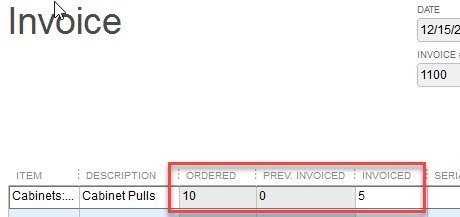
QuickBooks Invoices, Fort Worth, Euless, Grapevine, Irving

The Sales Order now also shows this information.
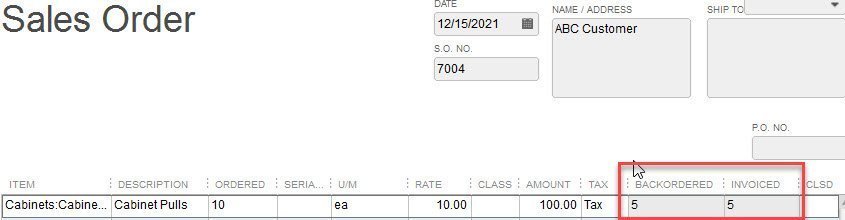
QuickBooks Expert, Fort Worth, Texas

The Open Sales Order by Item Report is also updated to include this information.

QuickBooks Help, QuickBooks Technical Support, Fort Worth, Texas, QuickBooks Reporting


Post navigation

Previous Previous
Learn QuickBooks Using a Sample File
NextContinue
Find Information in QuickBooks

About the Blogger

Tim Plue
Contact Me

I am an Advanced Certified QuickBooks ProAdvisor and certified in the new Intuit Enterprise Suite. I can help you use the many features of QuickBooks to analyze and grow your business.

I have taught QuickBooks and bookkeeping classes for over 12 years. I help small business owners run their businesses using QuickBooks. I can meet you on-site or remotely.

Let's see what QuickBooks can do for your business!


Blog Topics

  • Intuit Enterprise Suite
  • QuickBooks Desktop Enterprise
  • QuickBooks Desktop Inventory
  • QuickBooks Online

Popular Pages

Intuit Enterprise Suite

QuickBooks Desktop Enterprise

QuickBooks Online

Inventory Management

QuickBooks Reporting

Getting Started with QuickBooks

Learn QuickBooks

Linkedin

Quick Links

QuickBooks Insights

About

Contact

© 2026 Ledger Consulting

Terms of Use

Scroll to top
  • Home
  • QuickBooks Support
  • Inventory
  • Analytics
  • Insights
  • Contact